
Network Usage and Quick Details
You find an employee’s network usage in the quick details panel on the Office Dashboard. In the employee table, move the mouse over the computer icon at the far right of the row; the panel opens after a moment. You can also click the icon to open it.
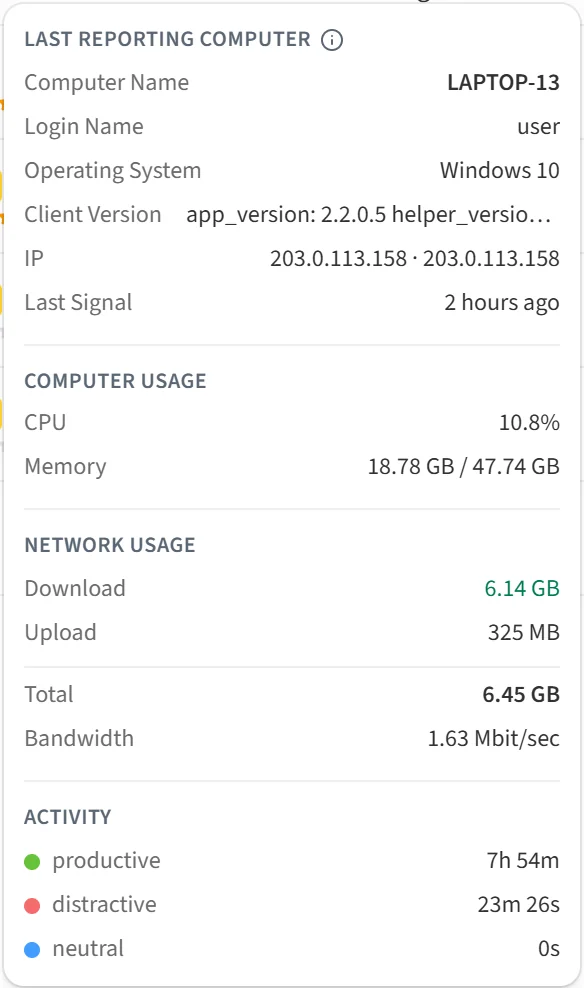
The panel has four sections.
Last Reporting Computer
The Computer Name, Login Name, Operating System, Client Version, IP and Last Signal time of the computer that most recently sent a signal to Berqun. An employee may use several computers; only the one heard from most recently is shown here.
Computer Usage
Average CPU and Memory usage on that computer.
These two sections appear only in the Day view.
Network Usage
How much data the employee downloaded (Download) and uploaded (Upload) in the selected period, the Total of the two, and the Bandwidth in Mbit per second.
Activity
Time the employee spent on productive, distractive and neutral activities in the selected period.
The network usage and activity sections also appear in the Week, Month and Year views, where they show totals for the selected period.